


However, this sophisticated leap in functionality comes with a trade-off that has raised privacy considerations among technology analysts and users alike. To power these advanced capabilities, Apple partnered with Google to train the underlying large language models. Furthermore, the new Siri requires access to a vast amount of personal information stored directly on users’ devices to deliver its tailored experiences. Because the assistant relies heavily on continuous data ingestion and processing, many privacy-conscious consumers are seeking ways to understand how their information is handled and how they can restrict the system’s access to sensitive personal data.

How Siri AI Accesses Data Across Your Applications
The core driver behind Siri AI’s enhanced personalization is a specialized developer framework known as App Intents. This architecture allows Apple Intelligence tools, including the newly redesigned Siri and Spotlight interfaces, to seamlessly interact with and pull data from a wide variety of native and third-party applications installed on Apple devices. When users activate the new digital assistant, Spotlight and Siri are unified into a single, cohesive interface. When a query is made, the assistant automatically scans through default Apple applications like Notes and Messages to unearth relevant information. Moreover, if third-party software developers choose to integrate App Intents into their programs, Siri gains the capability to scan through those external applications as well.
To process these complex queries, Siri AI utilizes a hybrid approach combining on-device machine learning models with Apple’s proprietary Private Cloud Compute (PCC) infrastructure. This means that certain intensive tasks require user data to be offloaded to remote servers for processing. Apple has maintained that its PCC infrastructure adheres to strict privacy standards, asserting that it does not store any data sent to its servers after a request has been fulfilled and that the company itself cannot view the transmitted information. Despite these cryptographic and architectural safeguards, many users remain uncomfortable with the broader scope of data indexing, leading to a strong demand for controls that allow individuals to manage what information Siri is permitted to access.

Restricting Siri AI’s Access to Content Inside Your Applications
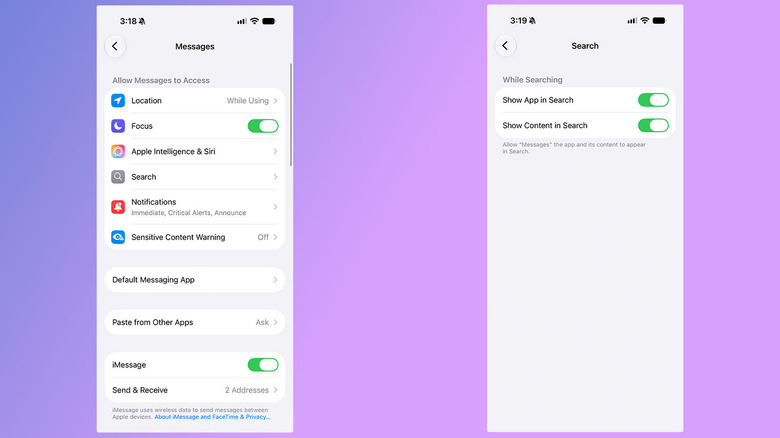
Because Apple has delegated the decision to third-party developers regarding whether Siri AI can access data generated within their apps, users retain the ultimate authority to dictate how deep the assistant’s reach extends. As long as developers allow iOS 27’s Spotlight tool to index application contents, Siri can surface that information dynamically. Fortunately, Apple has built controls into the operating system that allow users to intervene and restrict Siri from pulling data from specific applications entirely.
When a user chooses to disable content visibility for a particular app within the system settings, Siri is blocked from pulling information from that specific source, even if the user issues a direct command. For instance, if someone opts to disable indexing for the Messages app and subsequently asks Siri to summarize a recent conversation with a friend, the digital assistant will explicitly state that it cannot locate those messages.
Navigating the device settings reveals various options grouped under the Apple Intelligence and Siri categories. Many of these toggles do not carry direct privacy implications; rather, they govern how the operating system suggests applications within the search interface. Features such as app suggestions and usage learning merely assist the system in understanding usage patterns to appropriately surface applications when needed, rather than sharing personal content with external servers.
Managing On-Screen Awareness and Contextual Processing
Even after restricting Siri’s capability to actively search through stored application data, users can still leverage the assistant for ad-hoc assistance that requires immediate, contextual awareness. A built-in feature known as on-screen awareness permits Siri to read and interpret the contents of active screenshots and images. This functionality serves distinct benefits for accessibility purposes and allows users to quickly summarize lengthy text threads or visual articles on the fly. However, it is important to note that capturing a screenshot and prompting Siri to analyze it may result in that visual data being transmitted to Apple’s Private Cloud Compute servers for temporary processing.
Controlling Siri Recordings and Model Training Preferences
Privacy settings also extend to how user interactions are stored and utilized by the technology corporation. By default, Apple does not collect or use audio recordings and transcripts from individual interactions with Siri to train future iterations of the virtual assistant. However, during the initial device setup process for new software updates, some users may inadvertently opt into sharing these voice logs to help improve the service. Checking the system privacy settings allows individuals to verify and confirm that their Siri audio recordings and transcripts are not being contributed to ongoing machine learning model training programs.
Reverting to Older Siri Versions or Disabling the Assistant Entirely
For users who prefer the operational familiarity of older software iterations or wish to minimize their digital footprint further, Apple provides avenues to step back from the AI-powered experience. It remains possible to revert to the traditional version of Siri, enabling users to continue utilizing voice-activated features like CarPlay while significantly limiting their overall privacy exposure. Interestingly, the controls required to manage these legacy preferences are located within specialized device management sections rather than standard assistant settings. Alternatively, users who find advanced digital assistants unnecessary can disable Siri entirely through the primary settings menu. For those seeking to restrict other facets of the broader Apple Intelligence suite, official support documentation provides comprehensive guidance on managing system-wide AI features.