



Power outages rarely arrive with a convenient warning or schedule. When the lights suddenly go out, the immediate reaction for most people is fumbling in the dark for a flashlight or checking their smartphones for updates. Few people give a second thought to the electronics left plugged into the wall. Yet, according to electrical and hardware experts, leaving your desktop computer connected to a power outlet during a blackout—and more importantly, when the power comes back on—can spell disaster for expensive hardware components.
The widespread assumption is that a computer shutting down involuntarily during a blackout is adequately protected because it is no longer running. However, that perception is dangerously misleading. Even a powered-off computer maintains a continuous physical connection to a home’s electrical wiring, and that lingering circuit serves as a direct conduit for severe electrical damage. Modern desktop computers are exceptionally vulnerable to these events. Internal components such as motherboards, system memory, and solid-state drives feature delicate micro-circuitry that is remarkably sensitive to unexpected voltage fluctuations.
The scale of the risk becomes clear when examining how power grids behave during an unexpected disruption. When a power cut occurs—whether triggered by a grid overload, severe weather, local equipment failure, or a tripped household breaker—the electrical infrastructure does not simply go quiet. Voltage levels can fluctuate wildly in the immediate moments leading up to and following an outage. More critically, the massive surge of electricity that courses through the lines the exact moment power is restored is frequently far more destructive than the initial outage itself. Standard household electrical circuits in the United States operate at a baseline of 120 volts, and even moderate voltage spikes rising significantly above those normal levels can permanently fry sensitive silicon components.

Understanding the mechanics of these electrical events and knowing how to properly safeguard a home computer setup can prevent catastrophic financial losses, permanent data loss, and the immense frustration of tracking down expensive replacement hardware.
Turning off Your PC Isn’t Enough
A common misconception among consumers is that simply shutting down a computer through the operating system or flipping off the physical power button on the front of the case provides complete immunity against electrical anomalies. Unfortunately, that safety net is an illusion.
Even if a PC is completely powered down before a blackout hits, electricity can still travel seamlessly through the power cord and infiltrate internal components the moment the utility company restores power to the grid. Power surges are the primary culprit behind this hidden danger. These surges happen when there is a sudden, violent jump in electrical current running through the lines, most frequently triggered by lightning strikes or physical damage to nearby utility poles and power lines. Crucially, a lightning strike does not need to hit a residence directly to cause catastrophic damage; a strike miles away can travel through local transformers and surge directly into a home’s internal wiring. When the regional electrical grid kicks back online after a blackout, it frequently delivers an overwhelming secondary spike of electricity, meaning the window of danger extends well beyond the initial blackout.

Beyond the threat of external surges, an abrupt power loss while a computer is actively running introduces a completely different set of risks. Any files, documents, or background operations currently being saved or updated run a high risk of severe corruption. If a blackout strikes precisely during a critical operating system update or firmware flash, the resulting file corruption can render the entire system unbootable and unusable. Furthermore, for users whose systems still rely on traditional mechanical hard disk drives, sudden power cuts can force the read-write heads to drop abruptly onto the spinning magnetic platters, permanently ruining the hardware and destroying stored data.
How to Protect Your PC During a Power Outage
Mitigating these risks requires a proactive approach to home electrical safety. When severe weather forecasts predict heavy storms or rolling blackouts, the safest course of action is to properly shut down the operating system and physically unplug the computer’s power cord from the wall outlet. If a blackout has already occurred unexpectedly, it remains entirely worthwhile to unplug the machine immediately.
While attending to the computer, experts recommend extending the same precaution to other network and home entertainment hardware. Home internet routers are among the most frequently fried devices during electrical storms, traveling through incoming cable or telephone lines to ruin internal networking chips. Because regular reboots are already a healthy maintenance habit for modern networking gear, unplugging the router during an outage causes no harm. Other high-end electronics, such as televisions and gaming consoles, should similarly be disconnected from wall outlets until stable power returns.
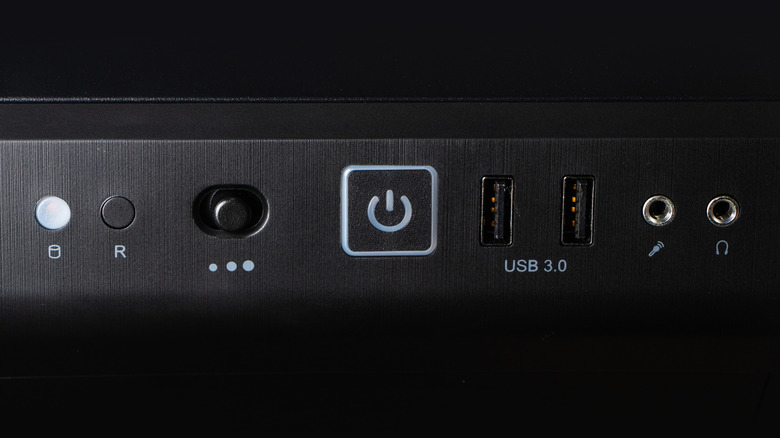
For desktop PCs, switching off the power supply unit via its physical rear toggle can help block some stray current from entering the internal system, but an extreme electrical event like a direct or nearby lightning strike can easily bypass that mechanical switch. Consequently, relying solely on manual unplugging is rarely enough for comprehensive, day-to-day protection.
Installing a quality surge protector serves as a crucial first line of defense, designed to absorb and divert unexpected voltage spikes before they ever reach connected equipment. For even greater security, many users invest in an uninterruptible power supply, commonly known as a UPS. This device combines continuous surge protection with an internal battery backup. While a standard consumer UPS is not designed to keep a power-hungry gaming rig running for hours during an extended blackout, it provides enough temporary runtime to allow the operating system to save active work and execute a safe, graceful shutdown rather than suffering an abrupt loss of power. For comprehensive home-wide protection, homeowners can also consult a licensed electrician to install whole-home surge protection directly into the main electrical service panel, shielding every individual outlet in the residence.
When utility companies finally restore electricity, exercising patience is vital. Technicians advise waiting several minutes after the lights come back on to ensure the grid has stabilized and won’t immediately trip again. When reconnecting equipment, plugging in the surge protector first, followed by the computer and its peripherals, ensures that any lingering initial voltage spikes are safely intercepted before reaching sensitive hardware.
Taking the few seconds required to unplug a computer during a blackout may feel like an inconvenience, but it remains one of the most effective and effortless ways to protect a significant financial investment. Combined with the use of surge protection hardware or a battery backup system, this simple habit dramatically reduces the likelihood of catastrophic hardware failure and heartbreaking data loss. Given the high stakes involved, the minor effort required offers substantial peace of mind.